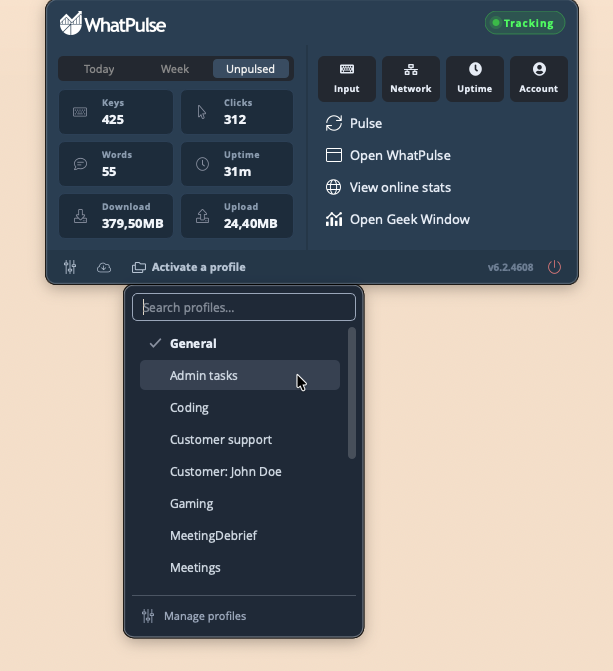
The tray popup
Clicking the WhatPulse icon in the system tray (or menu bar on macOS) opens the tray popup. In WhatPulse 6.3 it was redesigned from a single-column menu into a compact dashboard: your most important stats at a glance, plus quick access to everything you could do from the old menu.
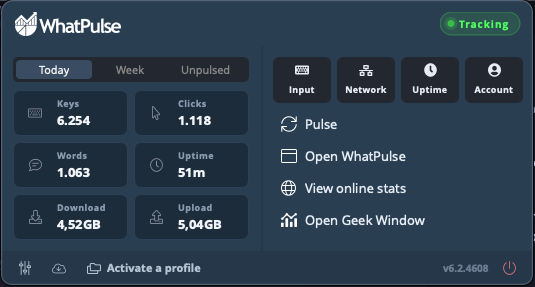
Stats at a glance
The left side shows a grid of six tiles: Keys, Clicks, Words, Uptime, Download, and Upload. Above it, a Today / Week / Unpulsed switch selects the period:
- Today and Week show your totals for that period, including stats you have not pulsed yet.
- Unpulsed shows only what is waiting for your next pulse.
WhatPulse remembers which view you used last, so the popup opens where you left off. The uptime tile adds up across all your profiles, keeping it consistent with the other tiles. A tile shows n/a if you have that statistic disabled under Active Stats.
Pause and resume
The pill in the top-right corner shows whether WhatPulse is currently Tracking or Paused. Click it to pause or resume stats collection. While paused, the stats grid dims with a Paused overlay so there is no mistaking the state.
Everything else
The right side of the popup holds the actions:
- A Jump to row with shortcuts straight into the Input, Network, Uptime, and Account pages of the main window.
- Pulse to pulse your unpulsed stats right away.
- Open WhatPulse to bring up the main window.
- View online stats to open your profile on the website.
- Open Geek Window / Close Geek Window to toggle the Geek Window (or Pulsar).
Along the bottom sit Settings, Check for updates, the version number, and Exit WhatPulse.
Profiles
If you are a Premium user with profiles, a profile chip appears in the bottom row. It shows the active profile (or Activate a profile when none is active). Click it to switch profiles; with six or more profiles a search box appears, and Manage profiles takes you to the profile settings.