Skill for AI Agents
Query your WhatPulse statistics with natural language. Keystrokes, mouse activity, application screen time, network bandwidth, uptime; all pulled directly from the local WhatPulse SQLite database.
Below will be using Claude Code as the example AI agent, but any agent that can run shell commands and read files can use this skill.
Installation
Download whatpulse.md and place it in your commands directory.
Global (available in all projects):
~/.claude/commands/whatpulse.md
Per-project (available only in that project):
your-project/.claude/commands/whatpulse.md
Create the directory if it does not exist:
# macOS / Linux (global)
mkdir -p ~/.claude/commands
cp whatpulse.md ~/.claude/commands/

# Windows PowerShell (global)
New-Item -ItemType Directory -Force -Path "$env:USERPROFILE\.claude\commands"
Copy-Item whatpulse.md "$env:USERPROFILE\.claude\commands\"
Restart Claude Code or OpenClaw after installing. The skill becomes available as /whatpulse.
Usage
/whatpulse
Returns a daily briefing: today's stats compared to your averages, top apps, and an insight.
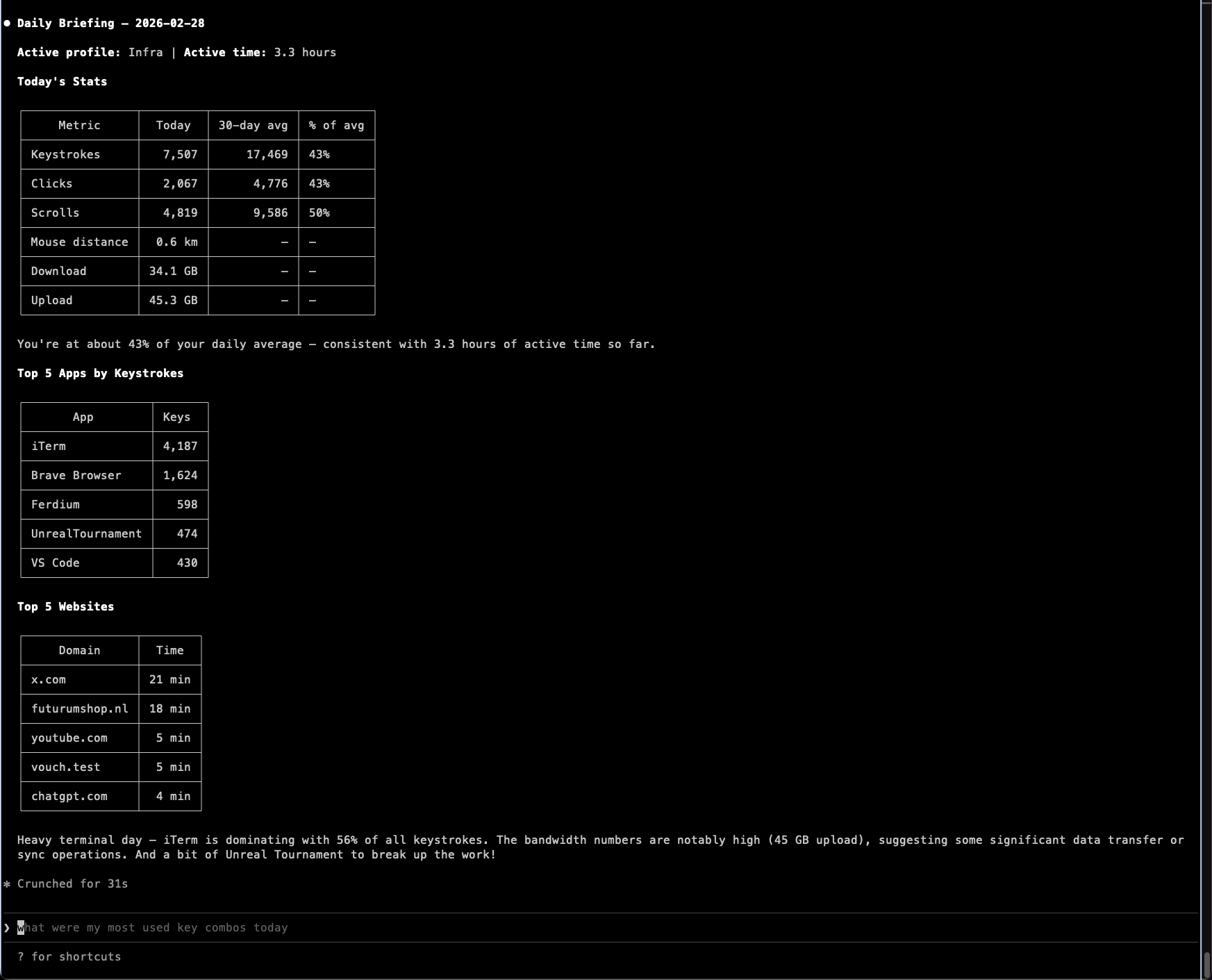
/whatpulse <your question>
Ask anything about your computer usage.
Example Questions
Daily and weekly overviews:
/whatpulse how productive was I today?/whatpulse summarize this week/whatpulse compare this week vs last week
Application usage:
/whatpulse what apps did I use the most this month?/whatpulse how much time did I spend in VS Code today?/whatpulse top 10 apps by screen time all-time
Keyboard:
/whatpulse what are my most-used keyboard shortcuts?/whatpulse which keys do I press the most?/whatpulse how many keystrokes did I type in the terminal this week?
Mouse:
/whatpulse how far has my mouse traveled?/whatpulse how much do I scroll per day?
Network:
/whatpulse how much bandwidth did I use today?/whatpulse which apps use the most bandwidth?/whatpulse top countries by network traffic
Websites:
/whatpulse what websites did I spend the most time on?/whatpulse how much time on GitHub this month?
Patterns and trends:
/whatpulse what's my most productive day of the week?/whatpulse what hours am I most active?/whatpulse am I working later than usual this week?
Profiles:
/whatpulse compare my profiles by keystroke volume/whatpulse show activity for the WP Dev profile
Database Location
The skill automatically locates the WhatPulse database. Default paths:
- macOS:
~/Library/Application Support/WhatPulse/whatpulse.db - Windows:
%LOCALAPPDATA%\WhatPulse\whatpulse.db - Linux:
~/.config/whatpulse/whatpulse.db
To override, set the WHATPULSE_DB environment variable:
export WHATPULSE_DB="/custom/path/to/whatpulse.db"
Remote Access
OpenClaw running on a remote server or cloud instance can query your WhatPulse data by syncing the database file.
1. Create a periodic snapshot
On the machine running WhatPulse, schedule a backup. The sqlite3 .backup command produces a consistent snapshot even while WhatPulse is actively writing.
macOS / Linux (cron):
# Runs every 4 hours. Edit with: crontab -e
0 */4 * * * sqlite3 ~/Library/Application\ Support/WhatPulse/whatpulse.db ".backup '/path/to/synced/whatpulse.db'"
Windows (Task Scheduler):
$action = New-ScheduledTaskAction -Execute "sqlite3.exe" -Argument "$env:LOCALAPPDATA\WhatPulse\whatpulse.db "".backup '$env:USERPROFILE\Dropbox\whatpulse.db'"""
$trigger = New-ScheduledTaskTrigger -Once -At (Get-Date) -RepetitionInterval (New-TimeSpan -Hours 4)
Register-ScheduledTask -Action $action -Trigger $trigger -TaskName "WhatPulse DB Sync"
2. Sync to the remote machine
Place the backup in a cloud-synced folder (Dropbox, OneDrive, iCloud Drive, Google Drive). Alternatively, use rsync or scp:
rsync -az /path/to/synced/whatpulse.db remote-server:/data/whatpulse.db
3. Set the environment variable on the remote machine
export WHATPULSE_DB="/data/whatpulse.db"
Add this to your shell profile (.bashrc, .zshrc) or OpenClaw's environment configuration so it persists across sessions.
Safety
All queries run with sqlite3 -readonly. No writes, no locks, no journal files. The WhatPulse database is never modified.