What's new with WhatPulse?
WhatPulse 6.3.2
Changes
- Updated Russian translation, thanks to Minto Hoshikawa
- Fixed the "today" stats values in the tray menu. For some people, it was including the unpulsed stats.
WhatPulse 6.3.1
A small follow-up release to 6.3 with a few bug fixes and interface improvements.
Scroll counting fixes
- Fixed an issue where scrolls weren't being counted for some mice using software such as Logitech Options+
- Improved scroll direction detection for certain high-resolution mouse wheels.
Input stats
- Gamepad and dictation device buttons once again show their correct names in the input statistics.
Other improvements
- Slightly larger tray menu icons and text for better readability.
- Added a Download avatar packs link in Settings → Geek Window, making it easier to browse and install new desktop avatars.
WhatPulse 6.3
WhatPulse 6.3 adds window title tracking, a redesigned tray popup, the new Pulsar desktop avatar, a cleaner Settings screen, and a large round of stability and correctness fixes.
Window title tracking
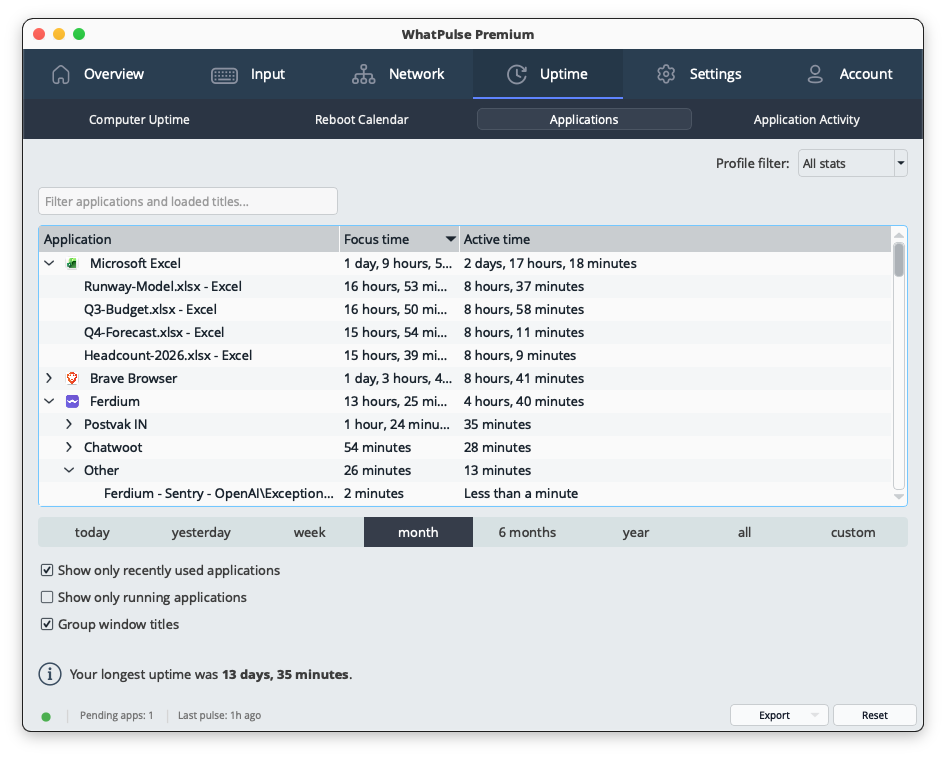
WhatPulse can now break your stats down by window title, not just by application. Expand any app on the Uptime and Input > Applications pages to see the documents, sites, and windows you spent the most time in - along with keys, clicks, scrolls, distance, and words per title - and use the search box to find a title across all your apps at once.
Window title privacy
Because titles can be personal, there is a full privacy layer. Turn off title tracking for specific apps (their uptime still counts), or add words and patterns to hide sensitive titles across every app. Three ready-made filters are included for emails, credit card numbers, and login details in web addresses. Titles from incognito and private windows are always hidden.
Group window titles into projects and workspaces
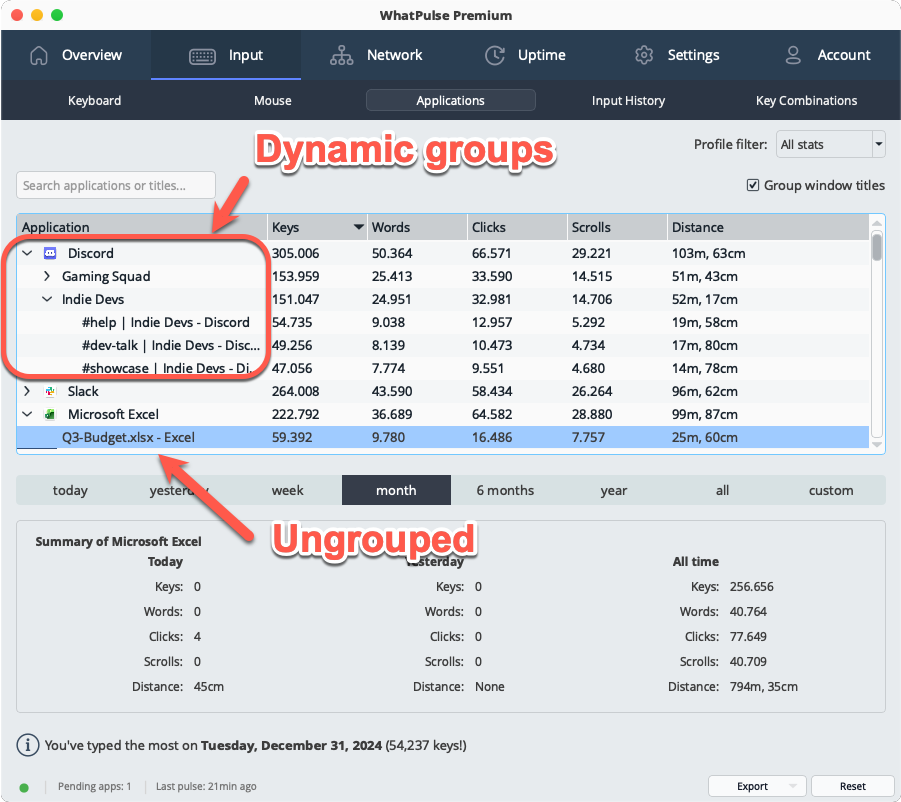
Long lists of per-title rows fold into meaningful groups: VS Code workspaces, IDE projects, Outlook folders, and similar. Grouping is computed in real time on Uptime and Input > Applications, with a single toggle on each page. Search stays flat so a matching title always shows up.
Redesigned tray popup
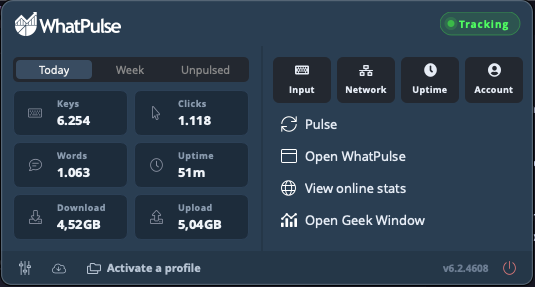
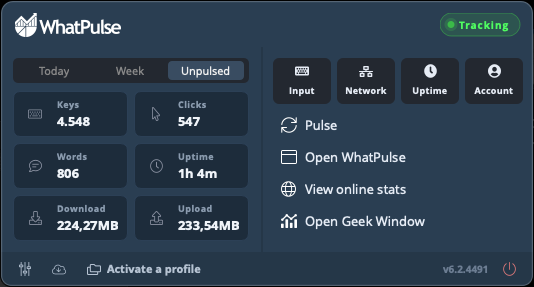
The tray menu is now a compact dashboard. A stats grid shows your Keys, Clicks, Words, Uptime, Download, and Upload, with a Today / Week / Unpulsed switch. Everything you had before is still there - Pulse, open WhatPulse, view your online stats, the Geek Window, and profile switching - just laid out to read at a glance.
Pulsar - a new geek window style
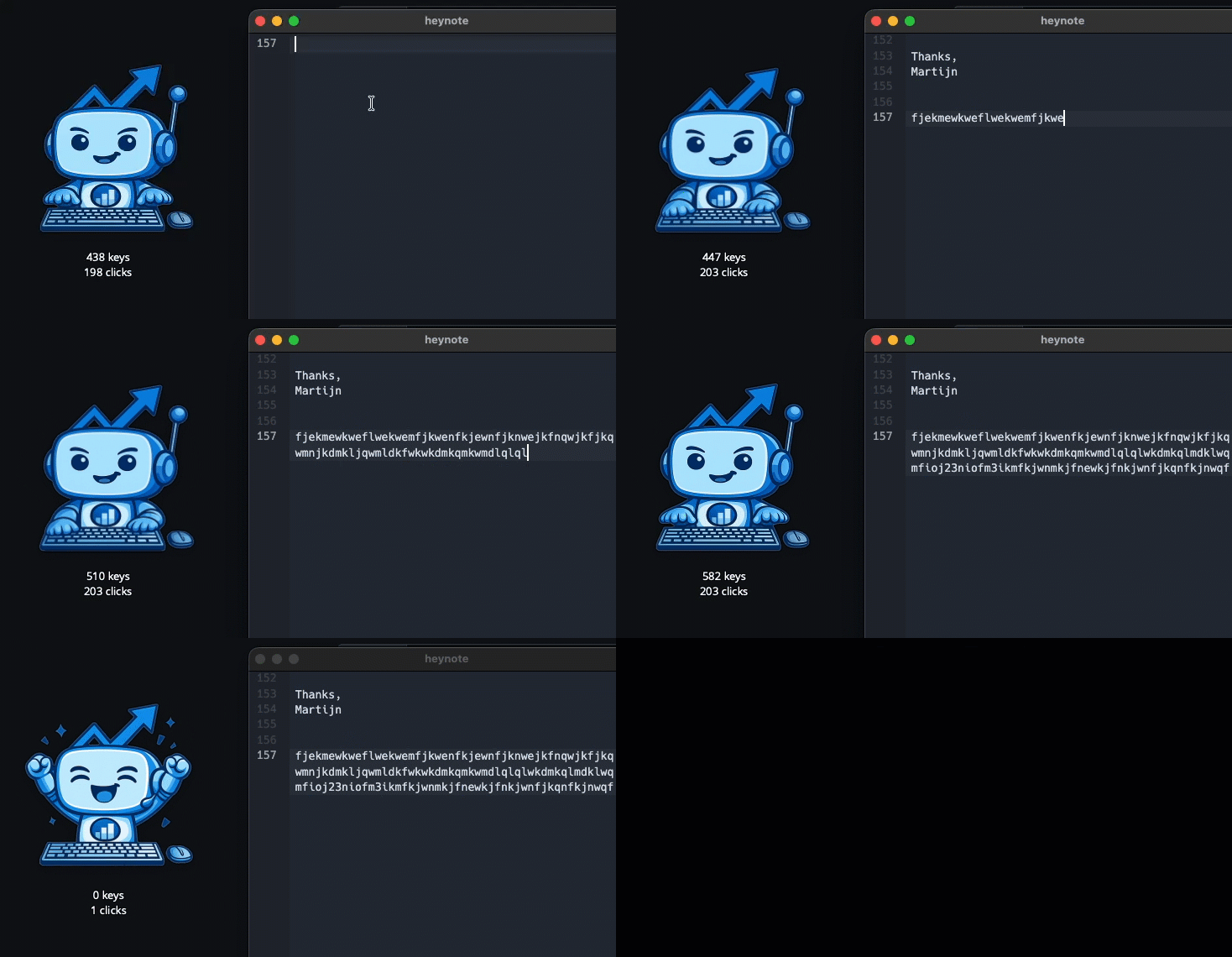
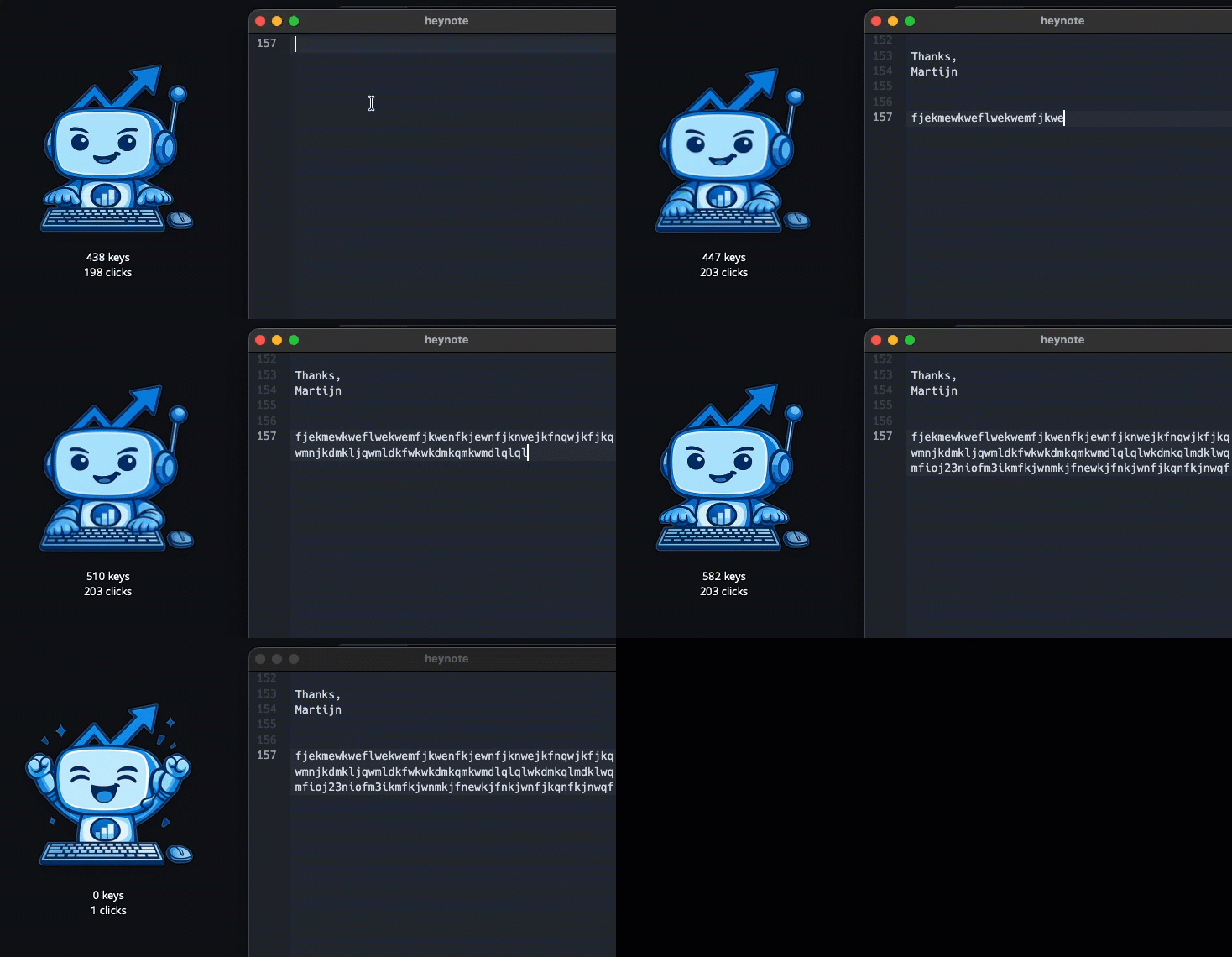
A Bongo Cat inspired desktop avatar that bounces on your keystrokes and clicks, falls asleep when you stop typing, celebrates after a successful pulse, and shows a small stats line underneath. You can also swap in your own artwork with custom avatar packs. Switch between the classic geek window and Pulsar under Settings > Geek Window.
More in this release
- A cleaner Settings screen. The exclusion and list screens throughout Settings now share one consistent design - app exclusions are a single list with a type picker, and network interfaces, Web Insights exclusions, window title filters, profiles, and milestones all use the same tidy, searchable table.
- See your update install. User-initiated updates now show a small progress window with a status line and progress bar, from download through install to restart. Automatic background updates stay silent, as they should.
- Correct keyboard heatmaps on non-QWERTY layouts. Layouts like AZERTY, QWERTZ, Dvorak, and Colemak now light up the right keys on both macOS and Windows, counted and drawn by the letter you actually type, with better auto-detection of punctuation-position letters, dead keys, and the number row. (QWERTY users are unaffected; the macOS change is forward-only.)
- Apps that never reached your online stats. Fixed apps - often newer ones - never appearing in your online profile despite being tracked locally. This sometimes happened when there are a lot of apps.
- Closing WhatPulse is now smoother and more reliable - sometimes the app would hang for a second or two, sometimes crashing on exit.
- Fixed stats silently freezing after a laptop woke from sleep: if your Wi-Fi adapter took a few seconds to reconnect, monitoring could stay stopped while the clock kept ticking. WhatPulse now keeps retrying until your connection is back.
- Fixed the Uptime page not showing new data on the "All" time period when the window was left open past midnight.
- The Input > Key combinations table now grows with the window instead of stopping at a fixed height.
- The milestones log no longer grows without bound; it keeps the last 100 records.
- WhatPulse is now available in Serbian, in both Cyrillic and Latin scripts (Settings > General > Language).
- Linux: fixed a crash that could happen when input devices (keyboards, mice, USB dongles) were unplugged, suspended, or disconnected, and a separate crash that hit every few hours of idle time as an internal watchdog slowly ran out of system resources.
- Linux builds now ship on Qt 6.9, bringing the Linux version up to date with the latest framework release.
WhatPulse 6.3-beta3
Last beta of 6.3, and this one lets you replace Pulsar with your own custom avatar, shows progress while an update installs, and fixes a batch of issues: apps missing from your online stats, missing app icons on Windows, keyboard heatmap layout detection, and a recurring crash on Linux.
Custom avatar packs for Pulsar
You can now swap the built-in Pulsar for your own artwork. Drop images into a folder (a single idle image is enough to get started) or import a ready-made .zip pack, then pick it from the new Avatar dropdown under Settings > Geek Window. A Refresh button reloads your images from disk, so you can tweak artwork and see the result live. There's a README in the folder that explains the naming convention for frames.
Update installation progress
Installing an update from within the app now shows a small progress window while the update downloads and installs, so you can see something is happening instead of waiting blind. Silent background updates are unchanged.
Apps no longer missing from your online stats
Fixed an issue where some applications - typically newer ones, like a freshly installed game - never showed up in your online profile even though they were tracked locally. Uploads are now driven by actual usage, so your most-used apps go first, and matching with the server is more reliable.
Other fixes
- Windows: app icons are now read directly from the application itself instead of through Windows shell extensions. This fixes crashes caused by buggy third-party extensions (OneDrive, Dropbox, and similar) and restores icons for users who had none. Classic monochrome icons now render too.
- Keyboard heatmap: fixed layout auto-detection issues reported on AZERTY - relocated letters (like the AZERTY M) no longer show double labels, dead keys (^ and ¨) get their proper labels, the number row is detected, and heat lands on the correct keys. The CSV export now follows your detected layout as well.
- Linux: fixed a crash that could hit every few hours when the computer sat idle - WhatPulse slowly ran out of system resources until it was forced to quit.
- The Input > Key combinations table now grows with the window instead of stopping at a fixed height.
WhatPulse 6.3-beta2
This beta builds on 6.3 beta 1: input stats are now broken down per window title, titles are now grouped into projects and workspaces, there is a new Pulsar desktop avatar as an alternative geek window, and Serbian joins the list of supported languages.
Per-title input stats
Keys, clicks, scrolls, distance, and words are now attributed to the window title they happened in, not just the application. Expand any app on Input > Applications to see your top titles, with the same search box you already have on Uptime. Controlled by the existing "Track per window title" toggle, so one switch covers both pages.
Group window titles into projects and workspaces
Long lists of per-title rows now fold into meaningful groups: VS Code workspaces, Word documents, Project management tools, and similar. Grouping is computed in real time and works on Uptime and Input > Applications. One toggle ("Group window titles") sits on each page, on by default.
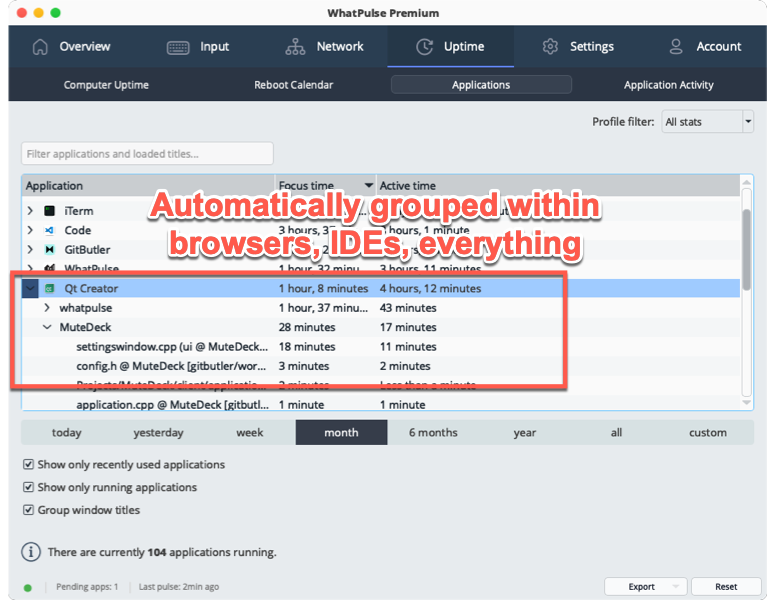
This is done automatically with a built-in heuristic, but there's also a small grouping pack that we can update from our servers with tuned rules for popular apps.
So far, we've not found any apps that need a custom pack, but if you do, let us know!
Pulsar - a new geek window style
A Bongo Cat inspired desktop avatar that bounces on your keystrokes and clicks, falls asleep when you stop typing, celebrates after a successful pulse, and shows a small stats line underneath. Switch between the classic geek window and Pulsar under Settings > Geek Window.
Other changes
- WhatPulse is now available in Serbian, with both Cyrillic and Latin scripts.
- Linux: Fixed a crash that could happen when input devices (keyboards, mice, USB dongles) were unplugged, suspended, or otherwise disconnected while WhatPulse was running.
WhatPulse 6.3-beta1
This beta adds window title tracking, a redesigned tray popup, and a cleaner Settings screen, plus a round of stability fixes.
Window title tracking
WhatPulse can now break your uptime down by window title, not just by application. Expand any app on the Uptime page to see the documents, sites, and windows you spent the most time in, and use the search box to find a title across all your apps at once. Like with any other metric, you have full control and can it on or off under Active Stats > Uptime.
Window title privacy
Because titles can be personal, there is a full privacy layer. Turn off title tracking for specific apps (their uptime still counts), or add words and patterns to hide sensitive titles across every app. Three ready-made filters are included for emails, credit card numbers, and login details in web addresses. Titles from incognito and private windows are always hidden.
Redesigned tray popup
The tray menu is now a compact dashboard. A stats grid shows your Keys, Clicks, Words, Uptime, Download, and Upload, with a Today / Week / Unpulsed switch. Everything you had before is still there - Pulse, open WhatPulse, view your online stats, the Geek Window, and profile switching - just laid out to read at a glance instead of as a long list.
Cleaner Settings
The exclusion and list screens in Settings now share one consistent look, with a search box and an easy app picker for choosing which apps to exclude.
Keyboard heatmap fixes for non-QWERTY layouts
- macOS: letter keys are now counted by the layout letter they produce. AZERTY, QWERTZ, Dvorak, and Colemak users on macOS will now see correct heat on the keys they actually press, correct word reconstruction, and correct key-combination labels. QWERTY users are unaffected.
- Windows: the auto-detected layout name (e.g. "Belgian (Period)") was being shown correctly, but the keyboard heatmap was still drawing a QWERTY board. AZERTY, QWERTZ, and other Latin layouts are now drawn correctly.
More in this release
- New setting to reset to your default profile when you lock your computer, so stepping away drops you back to the General profile (on by default).
- Several crash fixes across Windows and macOS, a smoother shutdown when you close the app, and a fix for stats freezing after your laptop wakes from sleep on Wi-Fi.
- Linux builds now use Qt 6.9.
Create and sync profiles across your computers
No more manually recreating profiles on every computer. Create them on the website and the WhatPulse desktop apps will automatically sync them.
Create once, track your time towards your Profiles on every computer you have.
WhatPulse 6.2.2
There were some leftover issues in v6.2.1 around the mouse heat map that v6.2.2 addresses:
-
Windows: Mouse heatmap attribution on secondary monitors: Clicks on secondary monitors now appear on the correct monitor in the heatmap instead of all piling onto the primary. Whether you were affected, depends on the display driver stack. Most commonly affected setups include virtual display drivers (DisplayLink docks, Spacedesk, parsec), HDR or DisplayPort MST chains, multi-GPU laptops, or KVM passthroughs.
-
Windows: Click and scroll tracking inside RDP sessions for Premium users: Premium users running WhatPulse on a Windows machine they're connected to over Remote Desktop now have their clicks and scrolls counted again. A 6.2 anti-cheat tightening was incorrectly catching legitimate RDP-delivered mouse input alongside injected input. Keystroke and mouse distance counts were unaffected.
WhatPulse 6.2.1
A focused follow-up to 6.2 with mouse heatmap fixes across all platforms, faster heatmap rendering on installs with long history, and a handful of smaller polish items.
Mouse heatmap fixes
- macOS: clicks on non-primary monitors are now placed correctly. Setups with mismatched sizes, vertical offsets, or monitors stacked above/below the primary previously had heatmap data shifted or missing.
- Windows: clicks on monitors hot-plugged after WhatPulse started are no longer silently dropped. The display list now self-heals when a new monitor is detected.
- Fixed the heatmap occasionally going blank or sticking on stale data when rapidly switching time periods.
- Heatmap queries are noticeably faster on installs with months of history.
Geek Window
- Total words variable added alongside the other word counters introduced in 6.2.
- The variable dropdown in Settings > Geek Window now lists "Total Words" and "Today Words" so you can pick them like any other counter instead of typing the variable name by hand.
Linux: Flatpak package
- WhatPulse is now available as a Flatpak in addition to the existing AppImage. Flatpak runs in a sandbox, installs and updates through your distro's software center or Flathub, and works the same way across every Linux distribution — handy if your distro doesn't play well with AppImages or if you prefer managing apps through a package manager.
Other
- Status pills now have a subtle hover effect on inactive items so it's clearer they can be clicked.
Safari support for Web Insights
Safari support has arrived for Web Insights!
You can now track your website usage in Safari, including active time, keyboard activity, clicks, and more. To enable Safari support, download the new “WhatPulse Web Insights” companion app from the downloads page and install the Safari extension.
There's a walk-through in the Help Center, showing how to install it.

Release notes
What's new with WhatPulse? See the latest updates and improvements.