WhatPulse 7.0
WhatPulse 7.0 is the biggest change under the hood since the app was first written. Counting now happens in its own background process, separate from the window you interact with. On top of that: a new sidebar navigation, a built-in feedback window, league standings on the Overview page, a universal macOS build, a big round of Linux improvements, and a long list of fixes. Let's dig in.
Counting and the window are now separate
WhatPulse is now two parts: a small background collector that counts your keys, clicks, uptime and network traffic, and the app window you already know. The collector starts at login and keeps counting on its own, so closing, restarting or even crashing the window never interrupts your stats. Heavy work in the collector, like counting a lot of network packets, can no longer slow down the interface. Quitting from the tray still stops everything, and if the collector ever stops unexpectedly, the app restarts it for you.
macOS: because the collector is a new program, macOS asks you once to allow Input Monitoring and Accessibility for it after updating. WhatPulse guides you through it and keeps counting uptime and network traffic in the meantime.
Linux: if you used setcap to allow network capture, grant it to whatpulse-collector instead.
New sidebar navigation
The top navigation bar and the per-page tabs are replaced by one sidebar with every page and sub-page in it. Collapse it to a slim icon rail and hover to reveal sub-pages. Prefer the old layout? Switch back under Settings > Appearance > Navigation.
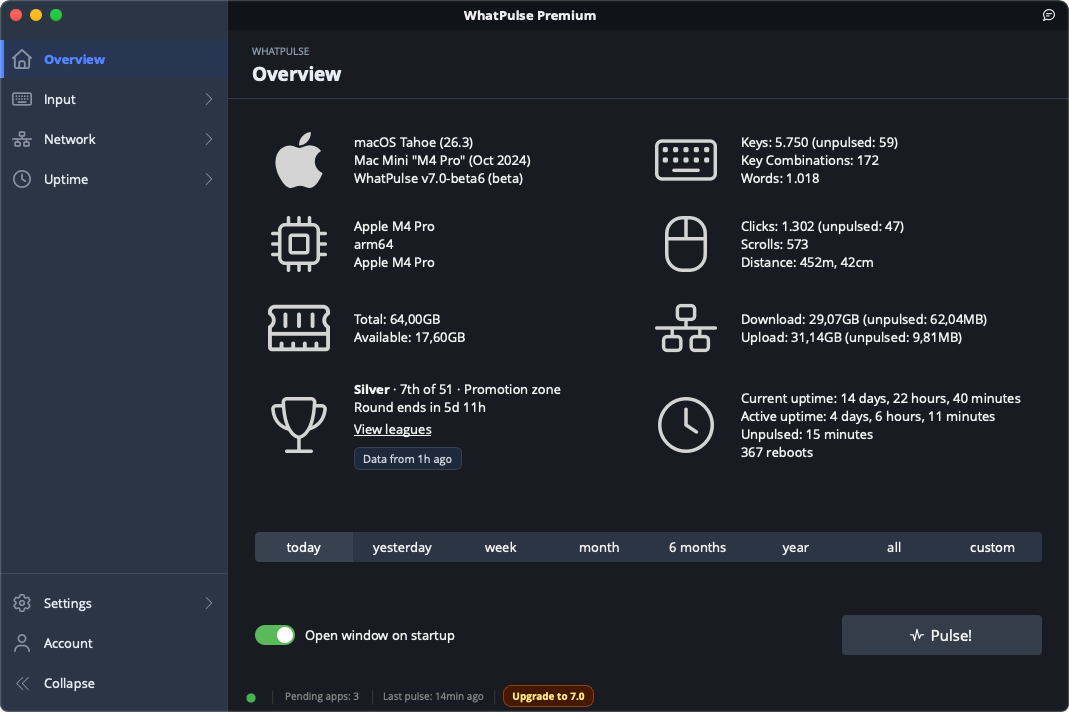
League standings
When you're in the Leagues, the Overview page shows your division, rank, zone and the time left in the round. Click it to open the full leaderboard. The Geek Window gets matching league variables.
Send feedback from inside the app
A new feedback icon in the title bar lets you report a problem, suggest a feature or send other feedback. Problem reports can attach your logs and statistics database so we can see what went wrong.
Better application recognition
Apps with generic names like game.exe are no longer merged together online. WhatPulse now also sends the app's publisher (Windows), developer Team ID (macOS) and store ID for games from Steam, Epic, GOG and the Microsoft Store.
Cleaner window title lists
Titles that change constantly, like FPS counters, media timestamps, download percentages and unread badges, are now collapsed into one entry. A background cleanup tidies up titles recorded before this update.
A fresh look
One consistent icon set across the whole app, and an installer that follows your system's light or dark mode. Plus it's prettier.
Platforms
- macOS: one universal build for Intel and Apple Silicon, with a native installer and updater.
- Windows: Launch when computer starts is always available again and follows the Startup apps toggle in Task Manager. Rounded window corners on Windows 10.
- Linux: AppImage updates now install and restart properly, Flatpak works on KDE Plasma and GNOME, IPv6 traffic and native Wayland apps are attributed correctly, sleep is detected, and processors and graphics cards show up.
Accessibility
The tray popup now works fully with the keyboard and screen readers. On macOS, right-clicking the tray icon opens a native menu with Pause/Resume tracking. The interface has been fully tested with VoiceOver and NVDA.
Fixes
- Fixed the mouse heatmap "Prune older than 3 months" setting deleting old data even when turned off.
- Fixed the tray popup's Today and Week views counting everything since your last pulse twice.
- Fixed deleted profiles being counted twice in the combined view. Existing duplicates are repaired automatically.
- Total uptime now only counts time WhatPulse measured, so a wrong system date can no longer inflate it.
- Fixed Geek Window labels disappearing or overwriting each other after adding them.
- Network traffic is attributed correctly on machines with multiple network adapters and on IPv4/IPv6 dual-stack connections.
- Many crash fixes, in the heatmaps, input capture, the Geek Window and during shutdown.
- Crash reporting now covers macOS and Linux too, and never includes what you type, window titles or app names.

WhatPulse 7.0
Released October 27, 2026.