Manage league notifications
WhatPulse can send two emails about your League activity. Both are enabled by default, and you can change them independently from most other WhatPulse emails.
League update
The Monday League update combines the previous result and the week ahead in one email. Depending on your activity, it can include:
- Your final rank, Pulse Score, and promotion, hold, relegation, or Legend-win result.
- Your new division and group.
- The number of promotion places available in the new round.
- A shareable result card.
- A reminder that your division is saved if you are sitting out the new round.
Mid-week league nudge
The optional Mid-week league nudge arrives on Wednesday while you are competing in an active round. It shows your current division and rank, and tells you whether you are in the promotion zone or how many Pulse Score points you need to reach it.
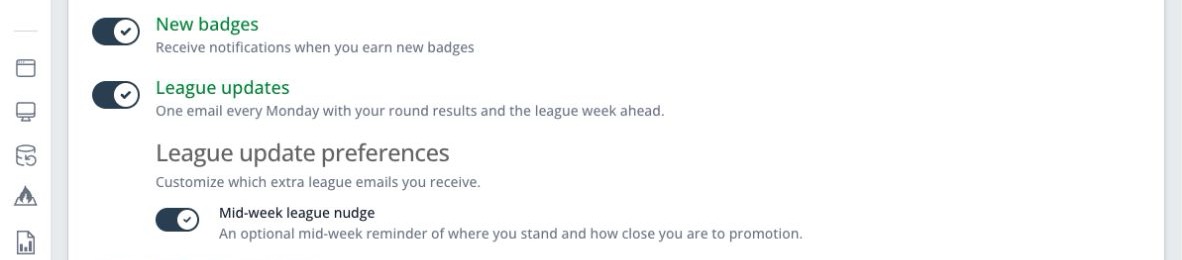
This reminder is a sub-setting of League updates. You can turn off the mid-week nudge while keeping the Monday email, but turning off League updates also turns off the nudge.
Change your league email settings
- Sign in and open Notification settings.
- Find League updates.
- Turn it off if you do not want the Monday result and placement email.
- To keep the Monday email but stop the extra reminder, leave League updates on and turn off Mid-week league nudge below it.
- Save your changes.
Turning off League emails does not remove you from your group. You continue competing and can follow your standing on the dashboard.
If you leave Leagues, all League email stops automatically, regardless of these settings.
Badge notifications
League badges use the separate New badges notification setting. Turning off League updates does not turn off badge emails. If you do not want an email when you earn a badge, turn off New badges on the same Notification settings page.
League notifications are currently sent by email and shown on the website. The WhatPulse desktop app does not currently provide League notifications.