
WhatPulse 6.1 shipped a few weeks ago with dynamic heatmaps, a new login flow, and quieter updates. But the feature I've been most curious to see people use is Geek Window formulas. The release post only scratched the surface, so this is the deep dive.
The Geek Window has always been a transparent overlay that shows your stats on screen. Keys, clicks, bandwidth, uptime - raw numbers, updating in real time. That's useful, but it's also limited. You couldn't combine numbers, calculate rates, or derive anything from the data. You just got what we gave you.
Formulas change that. You can now write arithmetic expressions inside any Geek Window label, and WhatPulse will evaluate them live. This turns the overlay from a passive display into something closer to a dashboard you design yourself.
How it works
A formula lives inside {= ... } delimiters within a label's text. Anything outside those delimiters is plain text that renders as-is. Anything inside gets parsed, evaluated, and replaced with the result.
A label like this:
Session score: {= %TodayKeys% + %TodayClicks% + %TodayScrolls% }
...becomes something like Session score: 14,832 on your overlay.
You can mix multiple formulas in a single label:
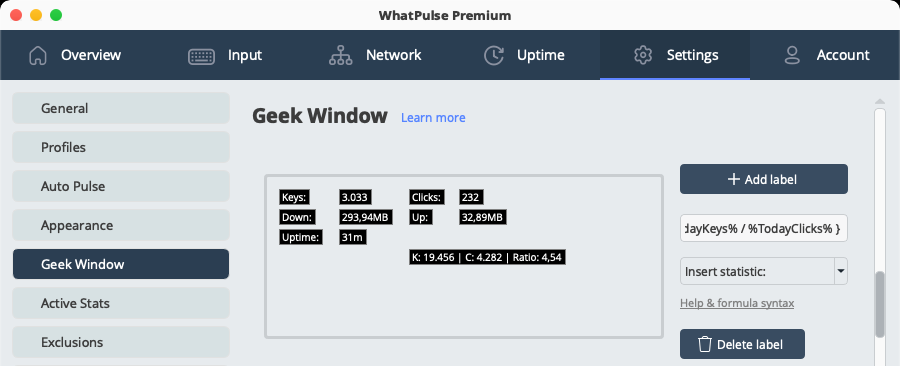
K: {= %TodayKeys% } | C: {= %TodayClicks% } | Ratio: {= %TodayKeys% / %TodayClicks% }
The parser supports +, -, *, /, parentheses for grouping, and unary minus. Standard arithmetic precedence applies - multiplication and division before addition and subtraction - and parentheses override as expected.
Variables use %Name% syntax. There are about 40 of them covering unpulsed stats, totals, today's stats, ranks, and rates. The Insert statistic: dropdown in the label editor shows you all the available variables and their current values, which is a great way to explore what you can use in formulas.
What you can actually build
The syntax is simple. Four operators and some variables. But combinations get interesting fast.
Typing speed over your session
The most obvious use: derive a rate from two stats.
{= %TodayKeys% / (%TodayUptime% / 60) } keys/min
This divides today's keystroke count by today's uptime converted to minutes. If you've typed 4,200 keys over 70 minutes of uptime, you'll see 60 keys/min.
Input mix breakdown
Are you a keyboard person or a mouse person? You might already know, but now you can quantify it.
Keyboard: {= (%TodayKeys% / (%TodayKeys% + %TodayClicks% + %TodayScrolls%)) * 100 }%
This calculates what percentage of your input actions today were keystrokes versus the total of keys, clicks, and scrolls combined. A developer might see 70%+. A designer working in Figma might see 30%.
Network ratio
If you're curious whether you consume more than you produce (most people do):
DL/UL: {= %TotalDownloaded% / %TotalUploaded% }x
A result of 12.50x means you've downloaded 12.5 times more data than you've uploaded over your WhatPulse lifetime. Developers running CI or pushing to cloud might see a surprisingly low ratio.
The "all time, right now" counter
WhatPulse separates unpulsed (local) stats from pulsed (total) stats. If you want a true running total:
Lifetime keys: {= %LocalKeys% + %TotalKeys% }
This is one of those things that seems obvious but wasn't possible before formulas. Your total on the website only updates when you pulse. This label gives you the real number, right now.
Scroll-to-click ratio
Scroll wheels and trackpad scrolling are a big part of how people navigate. How does your scrolling compare to your clicking?
{= %LocalScrolls% / %LocalClicks% } scrolls per click
If you're reading a lot of documents or code, this number climbs fast. I've seen mine hit 8x during code review sessions.
Bandwidth in human units
Network stats are stored in bytes, which isn't how anyone thinks about bandwidth. Convert to something readable:
Down: {= %TodayDownloaded% / 1073741824 } GB | Up: {= %TodayUploaded% / 1048576 } MB
Download in gigabytes, upload in megabytes. Pick whatever scale makes sense for your usage.
Rank math
Ranks are numeric too, so you can do things like calculate a combined rank or an average across stats:
Avg rank: {= (%RankKeys% + %RankClicks% + %RankUptime%) / 3 }
This averages your key, click, and uptime ranks into a single number. Lower is better. It's a rough "overall ranking" that doesn't exist on the website.
Under the hood
For those curious about how the parser actually works - it's a recursive descent parser. Clean, no dependencies beyond Qt itself.
The expression grammar is straightforward:
- An expression is one or more terms joined by
+or- - A term is one or more factors joined by
*or/ - A factor is a number, a variable, a parenthesized expression, or a negated factor
This structure naturally handles operator precedence. Multiplication binds tighter than addition because parseTerm is called from within parseExpression, and parseFactor from within parseTerm. No precedence tables, no token lists - the grammar itself does the work.
The parser is strict by design. If it can't consume the entire expression cleanly, it returns an error. Division by zero returns an error. Unknown variables return an error. NaN and infinity return errors. In all cases, the label shows #ERR and your overlay keeps running. No crashes, no blank labels.
Results are formatted with locale awareness. If your system uses comma separators, you get 1,234. If it uses periods, you get 1.234. Whole numbers drop the decimals; fractional results show two decimal places.
Errors and how to fix them
If you see #ERR on your overlay, here are the most common causes:
Misspelled variable. Variable names are case-sensitive. %localkeys% won't work - it needs to be %LocalKeys%. Check the variable references.
Division by zero. If a denominator variable is zero (like %TodayUptime% right after a restart), the formula returns an error. This resolves itself once the stat has a non-zero value.
Missing closing parenthesis. {= (1 + 2 } is a syntax error. Count your parentheses.
Trailing operator. {= 5 + } is invalid. Every operator needs operands on both sides (except unary minus).
Using a text variable. %CurrentProfile% is the one variable that returns text, not a number. Using it in a formula will error. It works fine in regular labels, just not inside {= ... }.
Tips
Start simple. Get one formula working before combining three. The #ERR output doesn't tell you which part failed, so short expressions are easier to debug.
Use parentheses liberally. Even when precedence would give the right answer, parentheses make your intent clear. Your future self will thank you when editing the label six months from now.
Mind the units. Uptime is in seconds. Distance is in inches. Bandwidth is in bytes. If your numbers look absurd, you probably need a conversion factor. Divide seconds by 3600 for hours, multiply inches by 0.0254 for meters, divide bytes by 1048576 for megabytes.
Layer your overlay. You can add multiple labels to the Geek Window. Instead of cramming everything into one formula, use several labels to build a personal dashboard. One for typing speed, one for network, one for your score - whatever matters to you.
What's next
Formulas are a foundation. Right now it's arithmetic on current and total stats. There's room to expand this - more variables, more functions, maybe conditional formatting. I'm watching how people use it before deciding what to add next.
If you've built something interesting with formulas, I'd like to see it. Drop by the Discord and share your setup. The best ideas for what to build next usually come from people actually using the feature.
WhatPulse 6.1 is available now. Update through the app or grab it from the downloads page.